Quickstart
Create the file
First, start by creating a configuration file, anywhere you want. Here, let’s take configuration-files/tftp/tftp_advanced.py as an example.
It should always start like this:
from boofuzz import *

class Config(BaseConfig):
    host = "172.23.1.134"
    port = 69
    socket = UDPSocketConnection
For convenience, we import the whole Boofuzz project, but you should be cautious and only import necessary classes.
Like every configuration file, we make it inherit from the BaseConfig.
Here, we use only 4 of the numerous parameters available from this base class :
host: the IP address of the target
port: the port of the target
socket: the connection type
In Boofuz, the Session object is the center of your fuzz… session. When you create it,
you’ll pass it a Target object, which will itself receive a Connection
object. Connection objects implement ITargetConnection. Available options
include TCPSocketConnection and its sister classes for UDP, SSL and
raw sockets, and SerialConnection.
Lucky for you, all that process is done in the backend by the BaseConfig class !
Configuration process
With than done, you next need to define the messages in your protocol. Once you’ve read the requisite RFC, tutorial, etc., you should be confident enough in the format to define your protocol using the various block and primitive types.
For that, you need to overide the Config method of the BaseConfig class :
def config(self) -> None:
    """Configuration file for a TFTP fuzzing session"""

    rrq = Request("rrq", children=(
        Static(name="opcode", default_value="\x00\x01"),
        String(name="filename", default_value="test"),
        Bytes(name="null", default_value=b'\0'),
        MultipleDefault(name="mode", values=["octet", "netascii"], type="String"),
        Bytes(name="null2", default_value=b'\0'),
    ))

    wrq = Request("wrq",
                  timeout_check=False,
                  children=(
                      Static(name="opcode", default_value="\x00\x02"),
                      String(name="filename", default_value="test"),
                      Bytes(name="null", default_value=b'\0'),
                      MultipleDefault(name="mode", values=["octet", "netascii"], type="String"),
                      Bytes(name="null2", default_value=b'\0'),
                  )
                  )

    data = Request("data",
                   timeout_check=False,
                   children=(
                       Static(name="opcode", default_value="\x00\x03"),
                       Static(name="block", default_value="\x00\x01"),
                       Bytes(name="data", default_value=b'\0'),
                   )
                   )

    ack = Request("ack", children=(
        Static(name="opcode", default_value="\x00\x04"),
        Bytes(name="block", default_value=b'\0\0'),
    ))

    error = Request("error", children=(
        Static(name="opcode", default_value="\x00\x05"),
        Bytes(name="error_code", default_value=b"\1"),
        String(name="error_msg", default_value="File not found"),
        Bytes(name="null", default_value=b'\0'),
    ))
Each message is a Request object, whose children define the structure for that message.
Once you’ve defined your message(s), you will connect them into a graph using the Session object :
self.session.connect(wrq)
self.session.connect(rrq)
self.session.connect(wrq, data)
self.session.connect(rrq, ack)
self.session.connect(wrq, error)
self.session.connect(rrq, error)
The order of the fuzzing session looks like this:
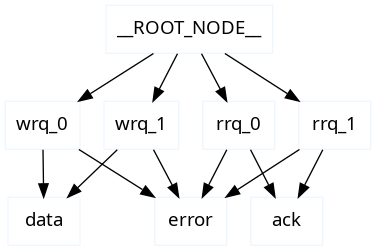
See the BaseConfig class for more information on the available options, including how to generate the graph !
Callbacks
If you need to do stuff between nodes, like getting the data port in TFTP, you could be interested in Callbacks. For example in TFTP, to get the data port, you could do something like this :
# At the top of the class
callback_module = TftpCallback

# In the config method
self.session.connect(wrq, data, callback=self.cb.control_to_data)
Instead of the original connection shown above.
This calls the control_to_data method of the BaseCallbacks class.
Each protocol, and sometimes each implementation of the same protocol, will have its own callback class.
All of them should implement the BaseCallback class.
Call the file
Now you are ready to fuzz ! For that, you need to call the main.py file with the path to your configuration file as an argument :
$ python main.py -f configuration-files/tftp/tftp_advanced.py
For other options, see Configuration of a session.
The log data of each run will be saved to a SQLite database located in the fuzzungus-results directory in your current working directory. You can reopen the web interface on any of those databases at any time with
$ boo open <database.db>
Debugging
If you want to debug a configuration that isn’t working, two main options :
Take a look at Boofuzz issues, often you will find that you ain’t the first one to have this problem.
Take a look at the examples in the configuration-files and examples directories. They are working examples of fuzzing sessions, and you can see how to use some functionalities for which the documentation is not clear.
Use your IDE debugger, and put breakpoints in the Boofuzz code. For example with VSCode, you can put breakpoints in the main files, like session.py, and go step by step, observing the state of memory and variables. For example, placing a breakpoint at the beggining of the _fuzz_current_case method :
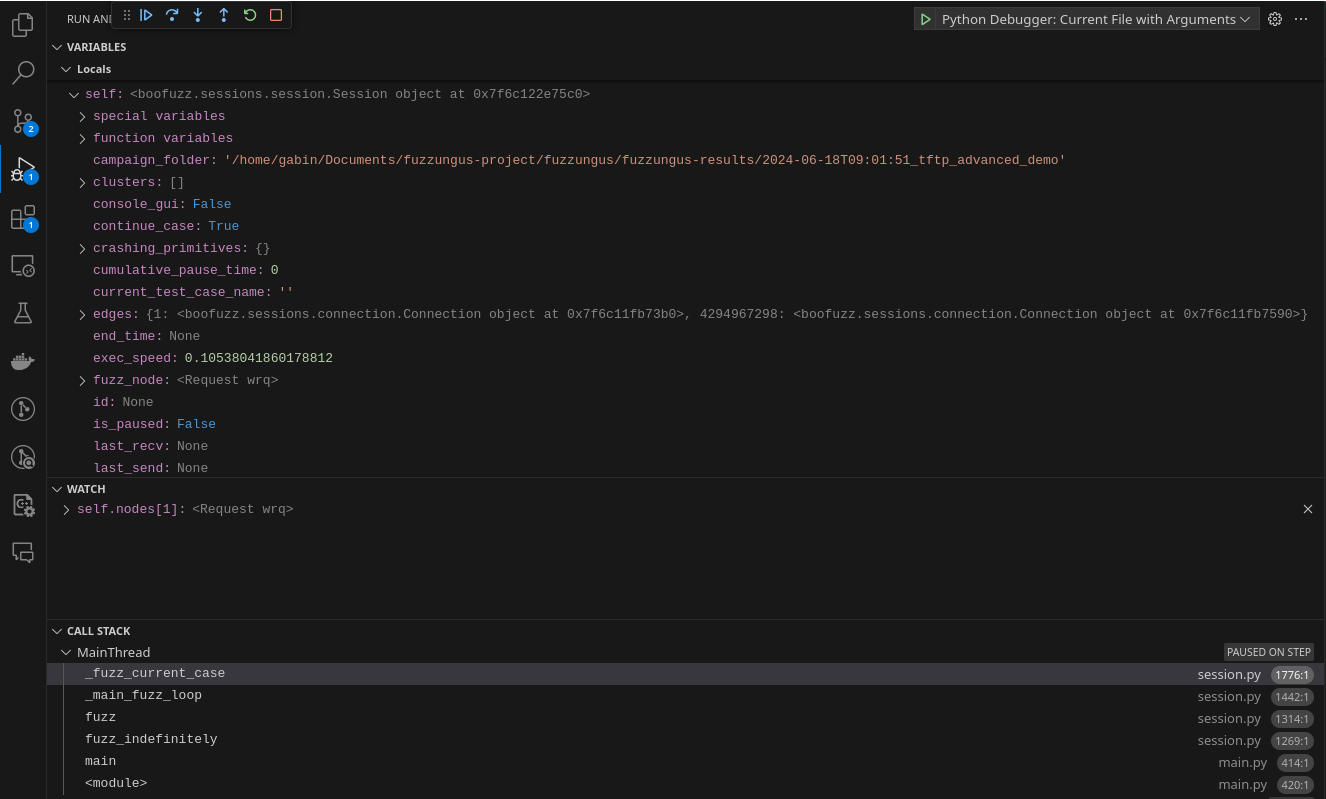
You can see :
The state of the local variables
One variable added to the Watch List
The call stack.